Teleport Blocks are special blocks used to teleport players, items, and mobs between locations. They can be obtained from the Science Shop, Adventures, etc.
Electricity Requirement
Teleport Pads require Electricity to function. Without power, they will not teleport players, items, or mobs.
| Stat | Value |
|---|---|
| Max Input | 50,000 watts |
| Storage Buffer | 750,000 watts |
| Consumption | 100 watts/second |
Place a Teleport Pad within range of an Electricity Receiver to power it. The pad will draw power automatically when linked.
Types of Teleport Pads
There are three types of teleport pads:
- Teleport Pads
- These act as regular teleport pads!
- Reinforced Teleport Pads
- An advanced teleport pad that transports items at a faster rate!
- Lucky Teleport Pads
- A teleport pad that only teleports Lucky mobs!
How to Use
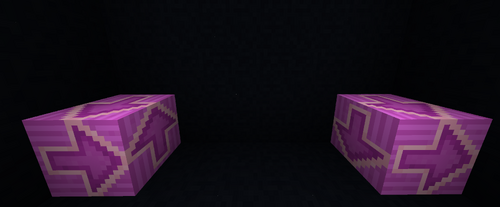
- Place the first Teleport Block on the ground at the location you want to teleport from
- Next, take another Teleport Block and place it at the destination where you want things to teleport to
- Once the two locations are successfully linked, the blocks will turn pink
- After the blocks are linked, you can right-click on either block to view details like the linked location, how many items have been teleported, and its current settings
- Ensure both pads are connected to Electricity for them to function!
TP Pad Configurations
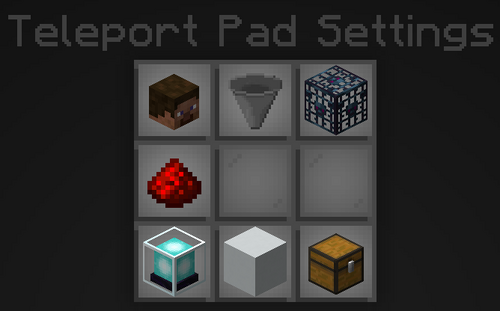
- To adjust the block's settings, shift-right-click the block. This allows you to customize its configuration.
- Important: Modifying one block will not automatically update the linked counterpart. Each block's settings must be adjusted individually!
| Option | Description |
|---|---|
| Teleport Players | Toggles teleporting players from the teleport pad |
| Teleport Items | Toggles teleporting items from the teleport pad |
| Teleport Mobs | Toggle to teleport Mob Spawner mobs from the teleport pad |
| Redstone Control | Toggle a redstone signal controlling the teleport pad on/off When in use, the teleport block requires redstone power to function and teleport items or entities. |
| Particles | Toggle if a particle plays when an item or player travels through the teleport pad |
| Blacklist / Whitelist | Filter has two different toggles Items inside the filter will NOT be picked up for blacklist Items inside the filter will ONLY pick up the items for the whitelist |
| Whitelist Filter | This option allows you to edit the filtered items |