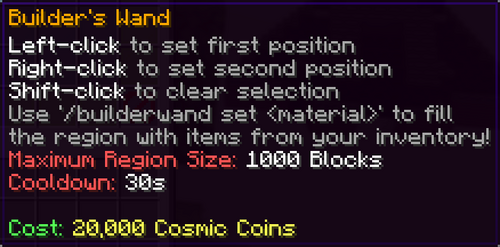
The Builders Wand is a utility item that allows you to fill large, rectangular regions with blocks all at once, instead of placing each block manually. It is especially useful for building farms, platforms, and other large flat areas on your Island.
How the Builders Wand Works
With a Builders Wand in hand, you define a region and then tell the Wand what block to place:
- Left–click a block to select your first position.
- Right–click another block to select your second position.
- Once both positions are selected, a chat message appears showing how many blocks are in the selected region.
- If the region size is less than or equal to your Wand’s Maximum Region Size, you can fill it by running:
/builderwand set <material>
If the region is too large, you will need to select a smaller area or use a Wand with a higher Maximum Region Size.
Using /builderwand set
When you run /builderwand set <material>, the Builders Wand attempts to fill every block in the selected region with the chosen material.
- The material you choose must be a block type that the Wand supports (see the list below).
- You must have enough blocks of that material in your inventory.
- As the Wand places blocks, it consumes them directly from your inventory.
- If you do not have enough blocks to fill the entire region, only part of the region will be completed.
The command does not create blocks out of nowhere – it simply automates placing the blocks you already own.
Supported Block Types
The Builders Wand is restricted to a specific set of block types. It can only place the following:
- Farmland
- Dirt
- Grass Blocks
- Coarse Dirt
- Stone
- Stone Bricks
- Smooth Stone
- Concrete (all color variants)
- Soul Sand
- Frog Lights/SeaLanters/Glow Stones
- All Glass Block Varieties
If you attempt to use the Wand with a material outside this list, the command will not work for that block type.
Inventory and Block Consumption
Because the Builders Wand automates building instead of generating free blocks, it always checks your inventory first:
- All blocks placed by the Wand are removed from your inventory as they are used.
- The number of blocks consumed matches the number of blocks successfully placed.
- If you cancel the process or run out of blocks mid–fill, the region will be partially completed based on how many blocks were available.
This makes the Wand a tool for speed and convenience, not a source of extra materials.
Obtaining a Builders Wand
There are two main ways to obtain a Builders Wand:
- The Enchanted Forest /realm shop, where it can be purchased using realm currency.
- The server /store, where it can be obtained as part of certain packages or offers.
Once you have a Wand, it can be reused as often as you like, so long as you stay within its Maximum Region Size and have enough blocks in your inventory to complete each build.