Item Flips: Difference between revisions
No edit summary |
No edit summary |
||
| (One intermediate revision by the same user not shown) | |||
| Line 11: | Line 11: | ||
=How Item Flips Work= | =How Item Flips Work= | ||
[[File:Itemflipshelp.png|link=|500px]] | |||
* Item Flips are conducted through a '''/trade-like GUI'''. | * Item Flips are conducted through a '''/trade-like GUI'''. | ||
* After accepting an Item Flip request, both players may place eligible items into the interface as their wager. | * After accepting an Item Flip request, both players may place eligible items into the interface as their wager. | ||
| Line 27: | Line 28: | ||
=Countdown & Execution= | =Countdown & Execution= | ||
[[File:ItemFlipRequest.png|link=|500px]] | |||
* Once both players confirm the Item Flip, a '''10-second countdown''' begins. | * Once both players confirm the Item Flip, a '''10-second countdown''' begins. | ||
* The countdown will cancel if either player exits the interface or attempts to change their wager. | * The countdown will cancel if either player exits the interface or attempts to change their wager. | ||
| Line 38: | Line 40: | ||
=Item Flip Credit= | =Item Flip Credit= | ||
{{1x1GUI | {{1x1GUI | ||
| icon = [[File: | | icon = [[File:Paper.png|48px|link=]] | ||
| tooltip = [[File: | | tooltip = [[File:ItemFlipCredit.png|300px|link=]] | ||
| name = <span style="color:#FFAA00">Item Flip Credit</span> | | name = <span style="color:#FFAA00">Item Flip Credit</span> | ||
}} | }} | ||
Latest revision as of 04:25, 24 December 2025
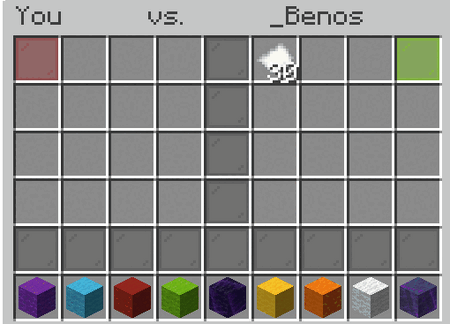
Item Flips are a wagering system on CosmicSky that allow two players to risk eligible items against one another through a trade-style interface. Rather than using currency, Item Flips operate by wagering items, with the winner receiving all items involved in the flip.
Item Flip Credits
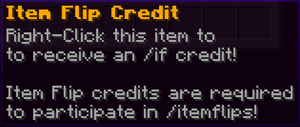
Sending an /itemflip request requires an Item Flip Credit.
- Item Flip Credit vouchers can be obtained from various in-game sources, including Adventures and Weekly Lootboxes.
- Only the player initiating the Item Flip is required to have a claimed credit.
- If the receiving player declines or cancels the Item Flip, the credit is returned to the sender.
- A player’s current Item Flip Credit balance can be viewed using /itemflip or /if.
How Item Flips Work

- Item Flips are conducted through a /trade-like GUI.
- After accepting an Item Flip request, both players may place eligible items into the interface as their wager.
- Players then select a color and confirm the Item Flip, similar to a standard /coinflip.
Eligible Wager Items
The following item types may be wagered in an Item Flip:
- Player Ranks
- Player Skill Tokens
- Slot Bot Tickets
- Lootboxes
- Cosmic Crates
- Lucky Blocks
- /skit Gems
- Inventory Pets
Countdown & Execution

- Once both players confirm the Item Flip, a 10-second countdown begins.
- The countdown will cancel if either player exits the interface or attempts to change their wager.
- If uninterrupted, the Item Flip proceeds at the end of the countdown.
Winnings & Collection

- The winning player receives all items wagered in the Item Flip.
- Winnings are delivered directly to the winner’s /collect.
Item Flip Credit


 Item Flip Credit