Auto Bot Upgrades: Difference between revisions
Created page with "__NOTOC__ Auto Bot Upgrades are special items that enhance the performance of a specific Auto Bot. These upgrades can be applied or removed at any time, allowing for flexible customization. Each upgrade affects only the bot it is placed on, and cannot be shared between bots. Upgrades can be found in various places such as Adventures and Lootboxes = '''Auto Miner Bot Upgrades''' = <div style="width:100%; display:flex; justify-content:space-between;"> <div styl..." |
No edit summary |
||
| (16 intermediate revisions by 2 users not shown) | |||
| Line 1: | Line 1: | ||
__NOTOC__ | __NOTOC__ | ||
Auto Bot Upgrades are special items that enhance the performance of a specific Auto Bot. These upgrades can be applied or removed at any time, allowing for flexible customization. Each upgrade affects only the bot it is placed on | Auto Bot Upgrades are special items that enhance the performance of a specific Auto Bot. These upgrades can be applied or removed at any time, allowing for flexible customization. Each upgrade affects only the bot it is placed on and cannot be shared between bots. | ||
Upgrades can be found in various places such as [[Adventures]] and [[Lootboxes]] | Upgrades can be found in various places such as [[Adventures]] and [[Lootboxes]]. | ||
'''Auto Bot Upgrades require the previous Upgrade tier in order to be used in an Auto Bot!'''<br> | |||
(i.e. a Tier 2 Auto Slayer Upgrade cannot be placed in an Auto Bot unless it already has a Tier 1 Upgrade applied to the bot.) | |||
* Breaking an Auto Bot with multiple upgrades in it will drop all of the upgrades. | |||
< | = Auto Bot Mega Modules = | ||
Mega Modules are the pinnacle of automation for your Auto Bots. Once a bot reaches '''Tier 3''', you can equip a Mega Module to retain all Tier 3 perks while unlocking powerful additional buffs and behaviors. | |||
[[ | With the introduction of the '''<span style="color:#FFAA00">[[Electricity]]</span>''' system, Mega Modules now require bots to operate entirely on electricity: | ||
</ | |||
* Bots '''must''' have an '''Electricity Adapter''' installed to use a Mega Module | |||
* Bots equipped with a Mega Module can **no longer run on fuel** | |||
* Powered bots will draw electricity from nearby Receivers: | |||
** '''16 blocks''' for Auto Harvesters | |||
** '''4 blocks''' for all other bots | |||
* Mega Modules enhance bot efficiency, movement, and utility once connected to your island’s power grid | |||
With proper electrical setup, Mega Modules provide unmatched automation potential, making your bots faster, smarter, and far more capable than ever before. | |||
= Auto Bot Upgrades and Modules = | |||
{| class="wikitable" style="width:100%; text-align:center; border-collapse:collapse;" | |||
= | ! style="width:10%;" | Bot Type | ||
! style="width:22.5%;" | Tier 1 Upgrade | |||
! style="width:22.5%;" | Tier 2 Upgrade | |||
! style="width:22.5%;" | Tier 3 Upgrade | |||
! style="width:22.5%;" | Mega Modules | |||
! style="width:22.5%;" | Mega Modules 2 | |||
|- | |||
! [[Auto Bots#Auto Miner Bot|Auto Miner Bot]] | |||
| [[File:MinerUpgradeOne.png|250px|link=|style="padding:1%"]] | |||
| [[File:MinerUpgradeTwo.png|250px|link=|style="padding:1%"]] | |||
= | | [[File:MinerUpgradeThreee.png|250px|link=|style="padding:1%"]] | ||
[[File: | | [[File:MinerMegaModule.png|300px|link=|style="padding:1%"]] | ||
| | |||
|- | |||
! [[Auto Bots#Auto Harvester Bot|Auto Harvester Bot]] | |||
== | | [[File:HarvesterUpgradeOne.png|250px|link=|style="padding:1%"]] | ||
[[File: | | [[File:HarvesterUpgradeTwo.png|250px|link=|style="padding:1%"]] | ||
| [[File:HarvesterUpgradeThree.png|250px|link=|style="padding:1%"]] | |||
| [[File:HarvesterMegaModule.png|250px|link=|style="padding:1%"]] | |||
| [[File:HarvesterMegaModule2.png|250px|link=|style="padding:1%"]] | |||
|- | |||
! [[Auto Bots#Auto Fisher Bot|Auto Fisher Bot]] | |||
| [[File:FisherUpgradeOne.png|250px|link=|style="padding:1%"]] | |||
| [[File:FisherUpgradeTwo.png|250px|link=|style="padding:1%"]] | |||
| [[File:FisherUpgradeThree.png|250px|link=|style="padding:1%"]] | |||
| [[File:FisherMegaModule.png|300px|link=|style="padding:1%"]] | |||
| [[File:FisherMegaModule2.png|300px|link=|style="padding:1%"]] | |||
[[File: | |- | ||
! [[Auto Bots#Auto Slayer Bot|Auto Slayer Bot]] | |||
| [[File:SlayerUpgrade1V6.png|250px|link=|style="padding:1%"]] | |||
| [[File:SlayerUpgrade2V6.png|250px|link=|style="padding:1%"]] | |||
| [[File:SlayerUpgrade3V6.png|250px|link=|style="padding:1%"]] | |||
[[File: | | [[File:SlayerMegaModule.png|300px|link=|style="padding:1%"]] | ||
| [[File:SlayerMegaModule2.png|300px|link=|style="padding:1%"]] | |||
|- | |||
! [[Auto Bots#Auto Smelter Bot|Auto Smelter Bot]] | |||
| [[File:SmelterUpgradeOne.png|250px|link=|style="padding:1%"]] | |||
[[File: | | [[File:SmelterUpgradeTwo.png|250px|link=|style="padding:1%"]] | ||
| [[File:SmelterUpgradeThree.png|300px|link=|style="padding:1%"]] | |||
| [[File:MegaSmelterModule.png|300px|link=|style="padding:1%"]] | |||
| | |||
|- | |||
! [[Auto Bots#Auto Crafter Bot|Auto Crafter Bot]] | |||
| [[File:CrafterUpgradeOne.png|250px|link=|style="padding:1%"]] | |||
| [[File:CrafterUpgradeTwo.png|250px|link=|style="padding:1%"]] | |||
| [[File:CrafterUpgradeThree.png|250px|link=|style="padding:1%"]] | |||
| [[File:MegaCrafterModule.png|300px|link=|style="padding:1%"]] | |||
== | | | ||
[[File: | |- | ||
! [[Auto Bots#Auto Seller Bot|Auto Seller Bot]] | |||
| [[File:SellerUpgrade1V6.png|250px|link=|style="padding:1%"]] | |||
| [[File:SellerUpgrade2V6.png|250px|link=|style="padding:1%"]] | |||
| [[File:SellerUpgrade3V6.png|250px|link=|style="padding:1%"]] | |||
[[File: | | [[File:MegaSellerBundleModule.png|250px|link=|style="padding:1%"]] | ||
| | |||
|- | |||
! [[Auto Bots#Auto Bundle Bot|Auto Bundle Bot]] | |||
| [[File:BundleUpgradeOne.png|250px|link=|style="padding:1%"]] | |||
[[File: | | [[File:BundleUpgradeTwo.png|250px|link=|style="padding:1%"]] | ||
| [[File:BundleUpgradeThree.png|250px|link=|style="padding:1%"]] | |||
| | |||
| | |||
|- | |||
= | ! [[Auto Bots#Auto Recycler Bot|Auto Recycler Bot]] | ||
| [[File:RecyclerUpgrade1V6.png|250px|link=|style="padding:1%"]] | |||
| [[File:RecyclerUpgrade2V6.png|250px|link=|style="padding:1%"]] | |||
| [[File:RecyclerUpgrade3V6.png|250px|link=|style="padding:1%"]] | |||
| | |||
== | | | ||
[[File: | |} | ||
[[File:SmelterUpgradeTwo.png| | |||
[[File:SmelterUpgradeThree.png| | |||
= | |||
[[File:CrafterUpgradeOne.png| | |||
[[File:CrafterUpgradeTwo.png| | |||
[[File:CrafterUpgradeThree.png| | |||
= | |||
[[File: | |||
[[File: | |||
[[File: | |||
= | |||
[[File:BundleUpgradeOne.png| | |||
[[File:BundleUpgradeTwo.png| | |||
[[File:BundleUpgradeThree.png| | |||
= | |||
[[File: | |||
[[File: | |||
[[File: | |||
Latest revision as of 04:31, 15 November 2025
Auto Bot Upgrades are special items that enhance the performance of a specific Auto Bot. These upgrades can be applied or removed at any time, allowing for flexible customization. Each upgrade affects only the bot it is placed on and cannot be shared between bots.
Upgrades can be found in various places such as Adventures and Lootboxes.
Auto Bot Upgrades require the previous Upgrade tier in order to be used in an Auto Bot!
(i.e. a Tier 2 Auto Slayer Upgrade cannot be placed in an Auto Bot unless it already has a Tier 1 Upgrade applied to the bot.)
- Breaking an Auto Bot with multiple upgrades in it will drop all of the upgrades.
Auto Bot Mega Modules
Mega Modules are the pinnacle of automation for your Auto Bots. Once a bot reaches Tier 3, you can equip a Mega Module to retain all Tier 3 perks while unlocking powerful additional buffs and behaviors. With the introduction of the Electricity system, Mega Modules now require bots to operate entirely on electricity:
- Bots must have an Electricity Adapter installed to use a Mega Module
- Bots equipped with a Mega Module can **no longer run on fuel**
- Powered bots will draw electricity from nearby Receivers:
- 16 blocks for Auto Harvesters
- 4 blocks for all other bots
- Mega Modules enhance bot efficiency, movement, and utility once connected to your island’s power grid
With proper electrical setup, Mega Modules provide unmatched automation potential, making your bots faster, smarter, and far more capable than ever before.
Auto Bot Upgrades and Modules
| Bot Type | Tier 1 Upgrade | Tier 2 Upgrade | Tier 3 Upgrade | Mega Modules | Mega Modules 2 |
|---|---|---|---|---|---|
| Auto Miner Bot | 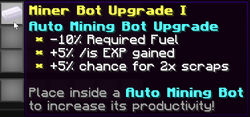
|
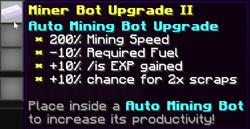
|
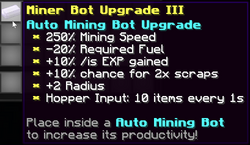
|

|
|
| Auto Harvester Bot | 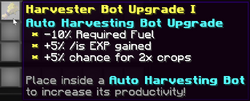
|
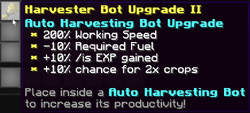
|
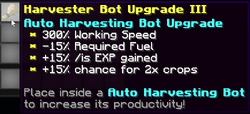
|

|
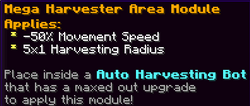
|
| Auto Fisher Bot | 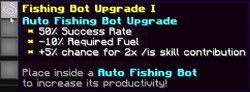
|
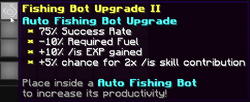
|

|

|
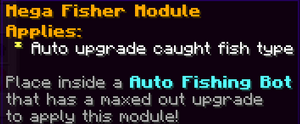
|
| Auto Slayer Bot | 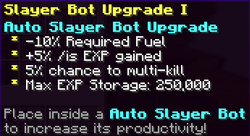
|

|
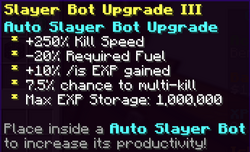
|
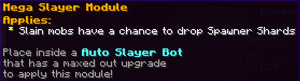
|
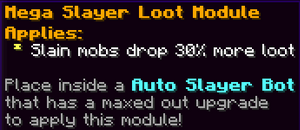
|
| Auto Smelter Bot | 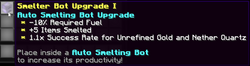
|
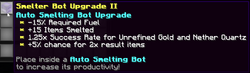
|
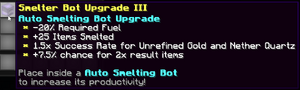
|

|
|
| Auto Crafter Bot | 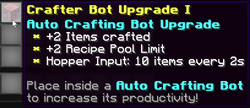
|
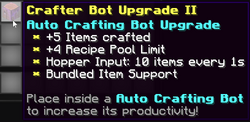
|
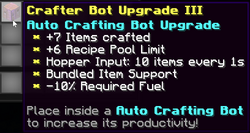
|
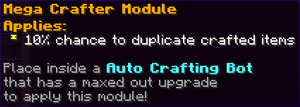
|
|
| Auto Seller Bot | 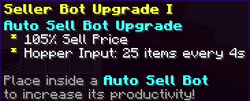
|
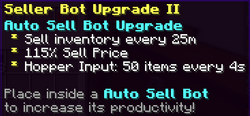
|
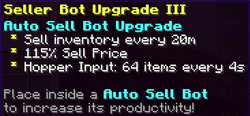
|
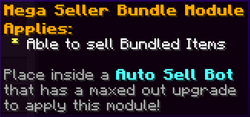
|
|
| Auto Bundle Bot | 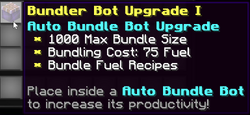
|
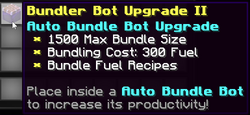
|
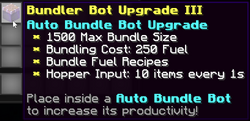
|
||
| Auto Recycler Bot | 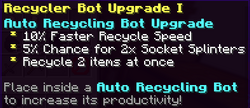
|

|
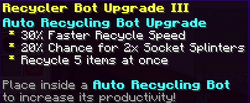
|